Earning Via Google AdSense


Google AdSense is an advertisment program own by Google. This program serve you with relevent ads by giving you the unique HTML code which you have to insert into your code. This program pays you in such a way that when visitor clicks on the ad from your web page Google get some revenue and split this revenue in two parts one for Google and one for you, and i think the percentage is 50 % each.


This revenue varies from topic to topic.

If you want to apply to Adsense just visit Google AdSense sign up page , But keep in mind that you must lies perfectly on AdSense policy. Before applying you must read the following tips:


1. First of all you need to create a website or webpage to which you place ads and if you are not a proffesional web designer or developer than create a free blog. There are many blogging platforms but the most popular and is widely used is Blogger and Wordpress and post some quality posts or articles and take some time.


2. Post articles regularly in order to get handsome traffic and post the articles to social networks or article directories. This way you have regular flow of traffic.


3. After that you must read Google's Adsense terms and conditions on thier page.


4. After reading if you think your webpage/blog is perfect for adsense then go to Google AdSense sign up page fill the form and submit it. Google take atleast 1 week to check your blog whether or not you accepted into this program.


When you accepted for the program you will recieve confirmation E-Mail. After that sign in to your AdSense account and follow the steps to add the Ad code into your page.


How to make blog .Just read the article Blogging
[Read More...]


Earn Money Via Blogging


Millions of People earn money via blogging. It is an easiest way to earn money online. Blog is basically a platform to tell people about you, your hobbies, working and lifestyle. But now-a-days people use blog earn money and they earn handsome amount. So if you fond of writting then its the best way to earn online. Regularly write articles in order to get follower and traffic which is the mean of online earning.


Now you have to decide which blogging platform you should use, there are number of platforms but some are most popular these includes Blogger and Wordpress

Blogger:

        Google is the owner of blogger. Blogger is very easy and user friendly platform, simple to operate.

Wanna join just goto here.


Whereas


Wordpress:

            Wordpress is quite similar to blogger but is somewhat difficult to understand. If you wanna join Wordpress just goto here


After setting up your blog you should make post and regularly do this . 1 post a day is not bad . This will help you to get good amount of visitors and followers.


Tips on Posts:

1) It is an excelent to choose a topic and just go for it.
2) Dont cover various articles.
3) Dont cover those topics which have vast back and foreground.
4) Choose highly demanding keywords.
5) Your post must be unique and will not match with none of the existing webpage.
6) Dont use porn on your site.
7) Illegal PPC ads on must not on your site.


After getting much traffic and visitors , now you can apply for Google Adsense .

To know about Google AdSense Read my post about Google AdSense.
[Read More...]


Ways to Earn Money Online


Hello guys...! 
well... today i wanna tell you about how you can make money online.
I have wrote many articles on this topic this post is basically collection of all these topics..


1) Earn Money via blogging.


[Read More...]


Window 7 Aero Blur Tweaker


Hi Guys, Today i am providing you the cool Windows 7 App that will be used to make your Explorer window , transparent. This app is knows as Aero Glass Transparency. Before taking much of your time i wanna show you the real difference .....


This picture is showing your current look of your windows explorer. If i am not wrong ,then this view is quite confusing, so i recomment you to Download this and use it.


And this is your new window after using Aero Glass Transparency.

That's nice,
So, how to use this app , you just have to download it . When you get the Download file you will see it is enclosed in archieve just unzip the archieve and run the .exe file.

Then a main window of the app showing you two bottons

1) Hide Blur.
2) Show Blur.

Just click on Hide blur and there we go you will see that cool efect . To revert/restore this effect click on Show Blur..


Download App
Thanx for visiting ..Keep visiting
[Read More...]


How to Convert media files with VLC Media Player


As you all know that VLC Media Player is a unique and multi format media player and is widely used. I think all of you have this and if any one does'nt have this just have it "Click here".

VLC player have a stunning feature of converting videos in various formats.


In this tutorial i am going to tell you how can we convert videos using VLC Media Player. This conversion is fully customizable. It is very usefull because when you are in a hurry and you dont have any converting Software installed in your PC you can use VLC player without any hasitation.


There we go...!
First of all you have to start VLC player from start menu.
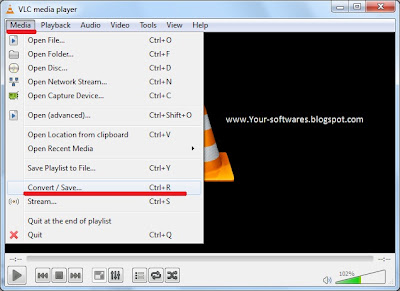
Now Press CTRL+R or by click on Media button from menu bar..


A new Window will appear you just have to add the file which you want to convert and click on convert/save button and select your mode from the drop down menu.


After that a new window appears in that window you just browse your destination folder , name your file along with the extension in which you are going to convert the file and press ok. Then, select the same format from the main window in front of Profile.


And finally press start button. Now you will see that your file is converting.
NOTE:For conversion from video to video do the same process with video ext. and video codecs.

Thanx for reading hope this is helpful to you.
For any question just drop a comment.


[Read More...]


Windows 8 Consumer Preview


Finally after Waiting so long, Microsoft Officially released Windows 8 Consumer Preview. It has Built in Softwares to make ISO files and burn it on the Compact Disc (CD). Various Bugs have been fixed. Be the first one to Download it.


As this is a Beta version so me and hope you all expect to have some new features in this beta version. For Example I want a new Boot up screen and don't want to have a start button :) like Ubuntu (Linux).


Like Windows 7, Windows 8 Consumer Preview check that will your PC able to run Windows 8 Consumer Preview or not So select the right Download. It also has upgrade assistance.


The Product key is " DNJXJ-7XBW8-2378T-X22TX-BKG7J "


Some Screen Shots:


[Read More...]


Windows loader (Vista, 7, Server)


After my previous post about the Windows 7 Activator, today i have made a plane to post something new about windows activator. Here is an other Windows Activator which have some Extra features and supports several Operating Systems. Windows Loader v2.1 is an amazing software for activating your OSs. You can activate windows as well as you can check your board also you can set Logo for OEM(Original Equipment Manufecturar).


Features:

1) Activate and Deactivate your Windows.
2) Set Logo for your OEM (Original Equipment Manufaturar ).
3) Other Settings in Advanced Options. 


[Read More...]


PageRank Display

PageRank

Recent Comments

Avoid Plagiarism

Protected by Copyscape DMCA Copyright Detector

Receive all updates via Facebook. Just Click the Like Button Below

▼

Powered By | Blog Gadgets Via Blogger Widgets

Return to top of page Copyright © 2012 | Your Softwares Maintain by Muhammad Ghalib Mirza